Loading Snapframe…
Free · Runs in your browser · Nothing uploaded
Redact sensitive info in a screenshot
One click reads your screenshot and blurs detected emails, IBANs, card numbers, API keys and phone numbers — then drag a box over anything else. It all runs in your browser, so your screenshot is never uploaded.
Auto-Redact · 3 secrets hidden
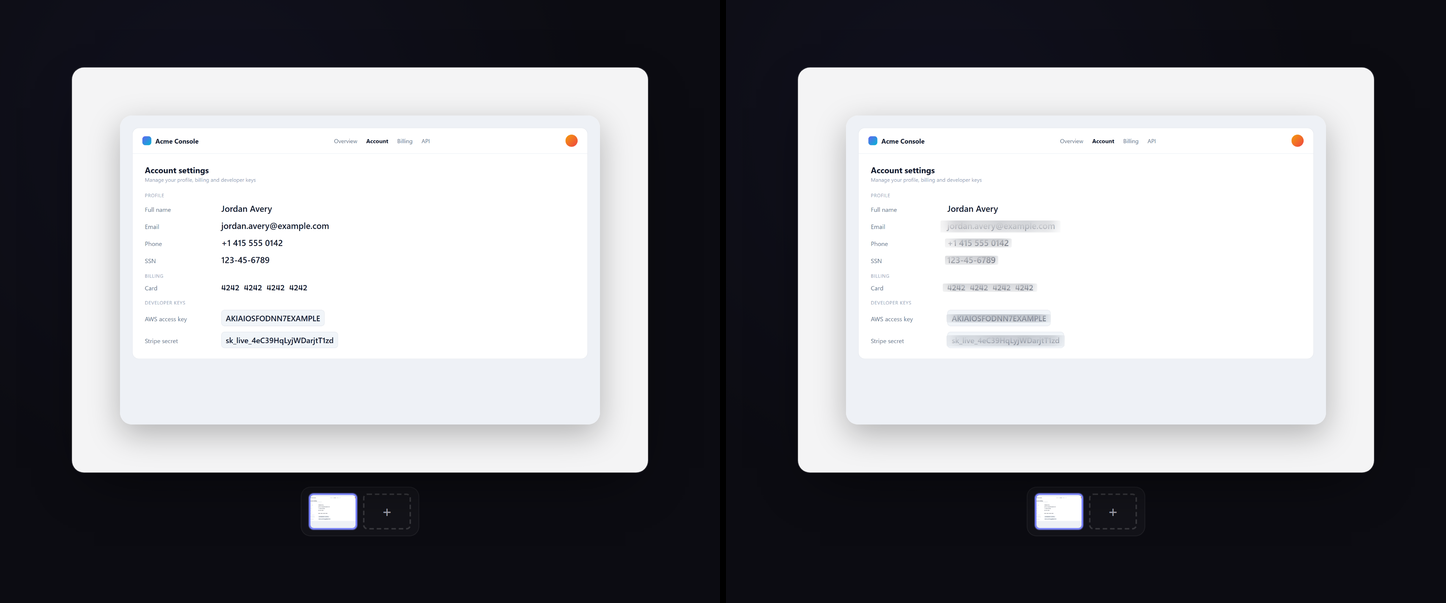
See it actually work
A real export from the Snapframe editor — six secrets (email, phone, SSN, card number, AWS and Stripe keys) detected and blurred in one click. Nothing left the browser.
What Auto-Redact catches
One click reads the image and covers the secrets that slip into screenshots most — and you handle the rest by hand.
📧
Emails & phone numbers
Auto-Redact spots email addresses and phone numbers in the image text and covers them before you share.
💳
SSNs, card numbers & IBANs
Social Security numbers, payment card numbers and IBAN-style bank details are detected and blurred, so a quick screenshot doesn't leak account or identity data.
🔑
API keys & tokens
Long secret-looking strings like API keys and tokens get flagged — the classic thing that slips into a terminal or dashboard grab.
🖱️
Manual drag-to-blur
Anything the detector can't know is sensitive — a name, an address, a face — you cover yourself by dragging a box over it.
Redacting one thing in particular?
Each guide covers what Auto-Redact spots on its own, what you still cover by hand, and the traps specific to that kind of secret.
API key or token
sk_, ghp_, xox — and why redacting a key is not the same as rotating it.
Read the guideSocial Security number
The ddd-dd-dddd pattern on a W-2, tax portal or benefits page.
Read the guideCard number
13–19 digit PANs, CVV and IBANs on a billing or checkout screen.
Read the guideEmail address
Inbox, CRM and support-ticket grabs, where addresses are everywhere.
Read the guidePhone number
Listings, leads and chat threads with a number in plain sight.
Read the guideRedact a screenshot in three steps
1
Drop your screenshot
Paste from the clipboard, drag a file or tap to browse — right in your browser. Nothing is uploaded.
2
Run Auto-Redact
One click reads the image and blurs detected emails, IBANs, cards, API keys and phone numbers. Then drag a box over anything else.
3
Export safely
Download a clean PNG, JPG or WEBP with the blur baked in — no hidden layer to peel back, up to 4K on Pro.
One-click redaction that runs on your device
Auto-Redact reads the text in your screenshot right in the browser and looks for sensitive patterns — emails, IBANs, card numbers, API keys and phone numbers — then blurs each one it finds. Your screenshot is never uploaded: only your device ever sees your pixels.
Automatic detection is a strong first pass, not a guarantee — give the result a quick check, and cover anything it missed by dragging a box over it. Every redaction is baked into the exported image, so there's no hidden layer underneath to peel back.
Good to redact
- Share a bug report or terminal output without leaking an API key or token.
- Post a dashboard or invoice screenshot with the IBAN and card number hidden.
- Send a support chat or inbox grab with customer emails and phone numbers covered.
- Drop a settings or billing screen into docs with account details redacted.
Why redact here
Private by design, permanent by default, and honest about what costs money.
Your screenshot never leaves your browser
Auto-Redact reads the image and blurs secrets locally on your device — your screenshot is never uploaded to a server. There's nothing to leak and nothing to delete.
The blur is permanent, not a layer
Redactions are baked into the exported image. There's no hidden original underneath to undo, recover or peel back — what you share is what's there.
Free, with an honest upgrade
Redacting and exporting is free in your browser. Pro is a single $24.99 payment that removes a small watermark and unlocks 2x and 4x export — no subscription, ever.
Redacting sensitive info — questions
What Auto-Redact catches automatically, what's left for you to cover, and what happens to the file.
How do I redact sensitive info in a screenshot for free?
Open the Snapframe editor, drop in your screenshot, and click Auto-Redact. It reads the image and blurs detected emails, IBANs, card numbers, API keys and phone numbers. You can also drag a box over anything else. Redacting and exporting is free; Pro ($24.99 once) removes a small watermark and unlocks 2x and 4x export.
Is my screenshot uploaded to a server?
No. Auto-Redact reads the image and applies the blur in your browser on your own device, so your screenshot is never uploaded. Nothing leaves your machine.
Can the redaction be reversed once I export?
No. The blur is baked into the exported PNG, JPG or WEBP — there's no hidden original layer underneath to peel back, so the covered values are gone from the file you share.
What kinds of sensitive data does Auto-Redact detect?
Auto-Redact looks for common sensitive patterns in the image text: email addresses, IBAN-style bank details, payment card numbers, API keys and tokens, and phone numbers. For anything it can't recognise — names, addresses, faces — you can cover it manually by dragging a box.
Blur a screenshot by hand
Drag a box over emails, keys or faces — baked into the export, no hidden layer.
Blur a screenshotFor developers
Clean code & UI shots for docs and PRs — and redact secrets before you share.
Developer guideThe full screenshot tool
Backgrounds, device frames, shadows, filters and batch export — all in one editor.
Screenshot toolHide the secrets — nothing to install.
Free, runs in your browser, no signup — your screenshot never leaves your device.